Articles - Latest and archive
Articles to inform, alert and inspire

While the concept of a flipped classroom may feel alien to those of us who went to school more than a few years ago, there’s a swathe of research suggesting that switching the tasks completed by students at home and those carried out in the classroom can have a significant effect on learning outcomes if this is adopted as part of a more thorough transition to a flipped learning environment. A recent article by EdTechReview found that 96% of teachers who have flipped a lesson would recommend that method to others and 9 out of 10 teachers noticed a positive change in student engagement since flipping their classroom.
Despite this, it still feels that flipped learning hasn’t quite reached the mainstream and the initial hype surrounding the concept is dying down. But is this really the case or is flipped learning simply adapting as teaching styles and classroom technologies evolve?
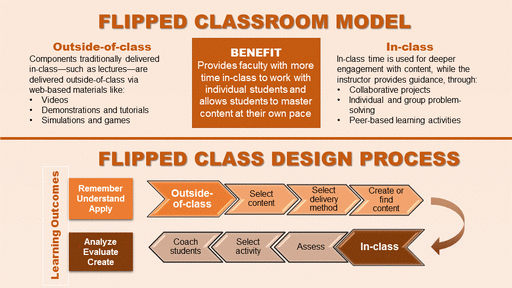
The original idea behind flipped learning was for students to study a subject in their own time by watching video lectures, reading around a topic, or solving additional problems at home, enabling the classroom to become more collaborative and focused around group working and learning.
This student-centred form of active learning is said to allow learners to explore topics in greater depth and create richer learning opportunities. However, some teachers didn’t embrace the concept, others thought their school wouldn’t embrace it and yet more implemented a hybrid version of flipped learning but didn’t fully commit to the process. Those that did flip their classrooms encountered a number of issues, most notable of which was having no control over whether students actually completed the at-home tasks.
So is flipped learning still a valid teaching method and if so what does the flipped classroom look like in 2017? In recent years it has become clear that while roles can be flipped, to achieve the full effect classrooms must also be designed to encourage collaboration and ensure students can be connected to any devices needed to complete the lesson.
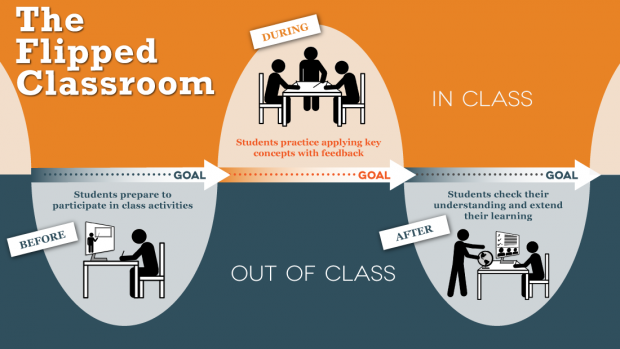
This being the case, the traditional rows of desks facing a teacher and screen is not the optimum setup. In a flipped classroom, groups of students will sit at desks around the room with a teacher station centrally located. Each group will have a display on the wall rather than a central projector or screen for the entire class. Interactive flat panels are particularly popular in this setup.
Many educators also promote having areas set aside for quiet work, and flexible modular seating areas for informal discussions. With students bringing their own devices and working with tools such as tablets and laptops, desks with integrated charging and storage points are also popular.
However, this kind of setup does not come cheap and, with school budgets already stretched, it may not initially seem like the best use of scarce funds. Having said this, it should be noted that, by their nature, collaborative classrooms are designed to work for multiple age groups across multiple subjects so even an investment in a single flipped learning space could have a big impact on a wide range of students. In addition, in the competitive higher education sector, innovative use of the latest technology can act as a key differentiator when it comes to attracting students, with many young people now stating this is a pre-requisite for their place of learning.
While evidence of the benefits of flipped learning is more anecdotal than quantitative, it does seem to boost student engagement and means lessons can be revisited as many times as a student feels is necessary to develop the required understanding. It also develops key skills such as collaboration, teamwork, analytical thinking and communication which are crucial to success in most workplaces. The ability of teachers to provide more personalised learning and more deeply understand how a student is progressing adds a further element to flipped learning that can’t be ignored.
While flipped learning may have stalled in the UK, the opportunities are undoubtedly huge. Talking to those who have already flipped their teaching spaces, or to integrators who can advise on the best use of technology to create the optimal learning environment is a great way to find out how it could work for your school and transform learning from primary to higher education.
Eliot Fulton-Langley - Solutions Architect, CDEC Ltd Published on June 7, 2017
 Despite teachers in many schools and universities using "massed" learning by repeating, rereading, cramming, and single-minded repetition of new skills, information or actions which create the illusion of mastery over a short period, research shows that these gains fade quickly and this is not the best way to learn and retain knowledge or skills over a long period (or for life).
"Massed learning" stores information in short term memory only, according to recent research.
These "massed" methods often result in the brain forgetting the information within a day or two, so topics you learn at the beginning of a course are mostly forgotten by the end - and if you want to earn higher marks and be a high achiever a different form of learning can be adopted by teachers, a coach or by yourself
More complex and durable learning comes from self-testing, introducing certain difficulties in practice, waiting to re-study new material until a little forgetting has set in, and interleaving the practice of one skill or topic with another.
TIRP is a mnemonic for remembering these stages : Testing, Interleaving, Reviewing and Pacing - which are detailed below. The process may seem counter intuitive and harder than learning by rote (and then forgetting very quickly) but has been proven to produce significantly higher performance which is retained for much longer (and for life if you continue the process)
This process will appeal to all those interested in the challenge of lifelong learning and self-improvement
E-Mail - Exciting Uses for your e-Learning VLE
 Hi David
Thank you David for all of your help, the website is beginning to come together I hope you agree.
As for a VLE it is something we would be interested in, but how do we tailor it to our learners and parents. The vast majority of our stuff is driven by individuals.
I am about to start a blogging component for ICT is there a way that we could create secure environment with logins managed by ourselves for students to create their own blog add video images and text?
Also a question I’ve been meaning to ask for a while now is how do I update and manage the links section on the home page?
Kind regards
John Munro
Cavendish High School
Hi John
Everything you describe, in your email, is available from your own VLE - individual (and secure) blogs, chat rooms, forums and groups in whatever way you want to use them plus Wikis, quizzes, surveys, assignments, databases, glossaries with text, graphics, video, sound and even sound feedback from teachers or others etc etc
It can be tailored for individuals, classes, year groups, teachers and governors, help groups, parents and all of these groups and individuals all at the same time, with individual, group/class, teacher, TA, Manager or mentor logins.
Each part can be as secure and as confidential or as open as you wish ....very very very flexible and very controllable and safe - it is your school's private system available to all users at school or home or anywhere on the web and to others that you grant access to.
It can be a very individual tool for users whether they are pupils, teachers, tutors, staff, admin, visitors, governors, helpers, carers, school's nurse, sports coaches, OFSTED inspectors, pupils and staff on activities outside school and on visits or whoever you choose to give controlled access to – and it can also cover things like Health & Safety, school policies, SEN and statementing etc for these groupings
AND it can be used for teacher training courses in whatever topic – Health & Safety or child safeguarding issues, for example – it's secure and confidential and info can be held that is only accessible by those with authority and approved to use it.
I'm going on a bit but it is an enormously creative environment for teaching and much much more
I hope this whets your appetite as you don't need to think of it as a regimented and rigid teaching system - it's not - it's more flexible than any paper based system I've ever come across (I was a moderator for some Manchester University courses, in the past, and just wish that I'd had a VLE then for holding the curricula, lesson plans, exam results and lecturers notes on students and my moderation reports all online)
No doubt speak to you some more on this - the first step would be to upload a system that you and we could play with together to develop a system for you
Sorry I forgot about the links page editing. Would this VLE link help ? You can login as guest This is one of our own VLE sites used for demos
Kind regards
David

Online e-Learning on your school VLE (like Moodle) has everything you need, including secure and confidential content, tablets that can be used anywhere, assignments can be reviewd online and automatically marked as can homework so teachers can get on with inspired teaching
So forget high powered iPads – all you need is a “Classroom Android Tablet” – no distracting games or access to downloadable Apps on it – the tablet can be pre-configured by the supplier to connect direct to your school VLE with everything else barred to pupils with few if any Apps and controlled access to the internet.
The pupils can login and connect immediately to their own workspace, no distractions to browse off somewhere away from the lesson, fully interactive interesting and exciting class work and assignments, all their work is saved securely, teachers can guide, review work, respond to queries, make notes, check performance of individuals or whole class statistics and use automated marking
The tablets don't need special charging or storage arrangements or system or software updating - they work out of the box and just need connecting to the under-desk power socket just like a PC. They connect automatically to your school VLE using WiFi.
Your VLE will have a text editor and other tools so your pupils don't need Microsoft Office to create documents, they can write and save their work securely and safely online – ready for them everytime they login. They don't need their own or a dedicated tablet as any classroom tablet will connect to their work - a separate keyboard can be connected to speed typing if they don't like the touch keyboard.
The tablet specification will be low which saves costs since high resolution and lots of memory is not needed – everything is online so no high resolution, memory hungry apps are needed, the cost of a 10” tablet is a fraction of the cost of an iPad Air and is a controllable teaching tool in the classroom with the same basic technology and content as the touchscreen or interactive whiteboards that your teaching staff are used to.
A 10” “Classroom Tablet” is an e-learning tool that could be taken home and is affordable for the majority of parents who need not worry that their offspring will download very expensive apps without their knowledge as the shopping feature and non approved sites are barred
Many schools are being very wrongly advised to buy expensive high performance tablets like iPads by those who extol the virtue of Apps, high resolution screens, and 16GB of memory because they make more money from the deal, they sound clueless to me of the real needs of teachers, pupils and school requirements.
Don't be fooled - get "classroom tablets" for all your pupils - not an overpriced, high tech, limited use toy for the few !
David Edis-Bates C.Eng MIET Dip Couns
 Learning has got really exciting bringing the thrill of gaming and fully interactive devices into the classroom with cloud type access to on-line learning and a myriad of teaching apps using latest Android technology for touchscreens and low cost tablets
At one end of the spectrum wall mounted LCD Touchscreens are the tough and robust low cost alternative to an interactive whiteboard. An LCD touchscreen has all the features and working area of a whiteboard and a lot more, but without the disadvantages of projector glare, high purchase and running costs, lighting reflection or needing blinds to be closed
Touchscreens are simple, intuitive and accurate to use by teacher and pupils, the familiar touch response so common to users on mobile phones gives users the confidence to be at the front of the room showing off their work.
The touchscreen surface is made from 4mm to 5mm toughened glass and is almost indestructible needing only an occasional wipe to remove finger marks. Gone are the days of having to clean projector filters, replacing very expensive failed lamps, with downtime in the boardroom or classroom.
With one of the mini android pcs that are now available, which is only the size of a USB memory stick you can turn your LCD touchscreen into a fully working PC with the added advantage of using either Android or Ubuntu operating system. Just connect an LCD Touchscreen to a mini Android PC and navigate your media with a WiFi mouse and keyboard. Access cloud apps and documents, play games, surf the web, and view photos and HD video.
Since the Android PCs support Wi-Fi Direct this lets you connect directly to nearby peer devices over Wi-Fi, for more reliable, higher-speed communication. No internet connection or tethering is needed. Through third-party apps, you can connect to compatible devices to take advantage of new features such as instant sharing of files, photos, or other media; streaming video or audio from another device; or connecting to compatible printers or other devices direct from the touchscreen.
This WiFi connection also enable you to connect the touchscreen to your VLE system such as Moodle so that online lessons can be displayed in full interactive mode and files can be accessed online or on the network server
At the other end of the spectrum Android Tablets are the hand held version of the wall mounted touchscreen which are lower cost than iPads or case mounted PCs, easy and convenient to use with a host of accessories such as keyboards and mice and thousands of apps for the classroom that make old PCs redundant and are a superb low cost replacement for PCs
Add Android tablets to the WiFi network and you now have a fully interactive classroom with each pupil able to interact, communicate and really enjoy the learning experience. The Android tablet brings the touchscreen to the pupil and with a VLE is able to work at their own pace if the teacher wants, complete assignments or quizes on-line, interact with other class members through chat, blogs and forums and complete projects collaboratively using the workshop and wiki facilities of the VLE. Learning need not finish in the classroom as the VLE is available on-line at home too !
Author : David Edis-Bates
Android Tablets for the Classroom